Free for every masjid · every country

The Azan & Iqamah screen your masjid deserves

Masjid TV is a free Android TV app that shows Azan and Iqamah times, live countdowns, Jumu'ah and Ramadan timings on your mosque screen. Set it up from your phone, or directly on the TV with the remote, with or without internet.

No cost, no adsSilent display244 countriesWorks offlineRamadan mode
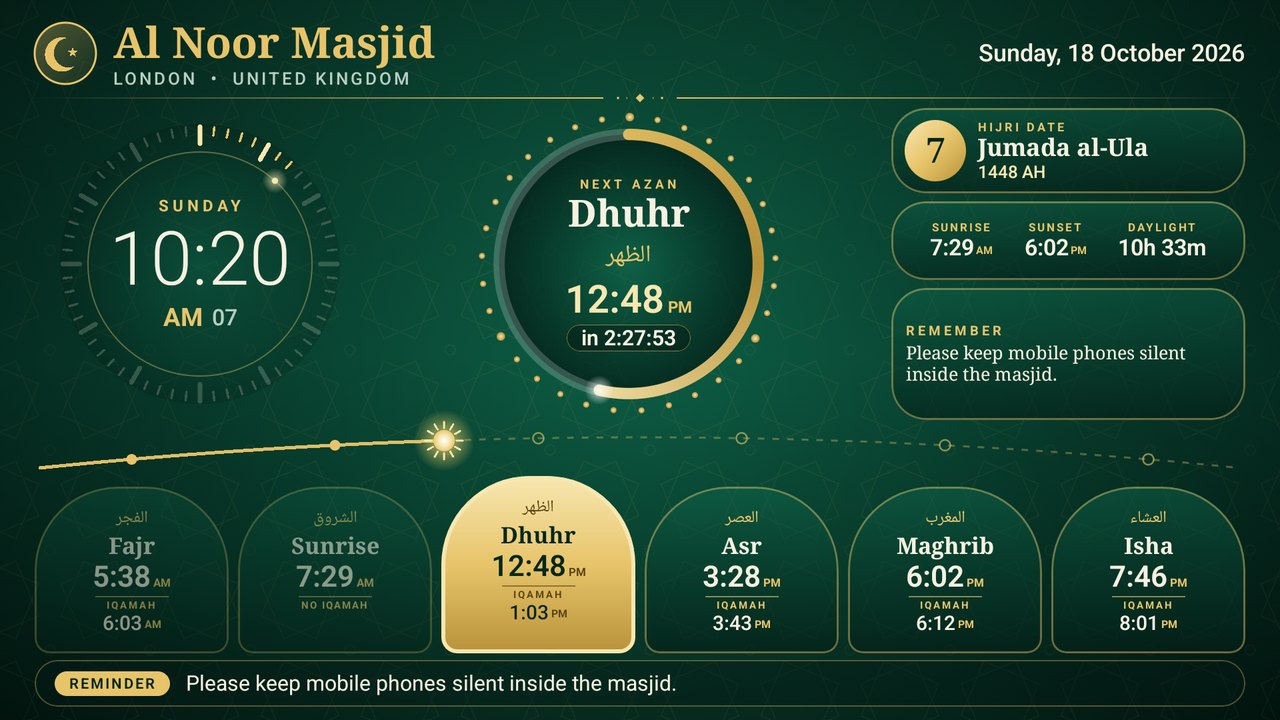
Masjid TV main screen showing Azan and Iqamah times, a countdown ring and a sun arc
Next AzanAsr in 2:20:50
Iqamah gap+15 min
Works inany city
Live demo · calculated in your browser

Prayer times today

Choose any city in the world. Times use the city's own time zone and daylight saving.

What is Masjid TV?

Masjid TV is a free software service that turns any Android TV into a masjid prayer-time board. It shows the five daily prayers plus sunrise with Azan and Iqamah times, counts down to the next Azan and to the Iqamah, switches to a calm “prayer in progress” screen during prayer, and shows Jumu'ah, Ramadan (Suhoor, Iftar, Taraweeh), notices and events. It covers 12,900+ cities in 244 countries, runs without internet, and can be managed from a phone.

Everything a masjid needs on one screen

Every feature is built for the way masjids really work – and every one is free.

Azan & Iqamah times

Fajr, Sunrise, Dhuhr, Asr, Maghrib and Isha, each with Azan and Iqamah, in big clear numbers. The next prayer glows gold.

Live countdowns

Counts down to the next Azan. After Azan it counts down to Iqamah with a gold ring, a flip clock, or a full-screen display.

“Prayer in progress” screen

When Iqamah starts, a calm screen asks everyone to silence phones and straighten the rows. It returns by itself after 2 minutes (or as long as you set).

Jumu'ah (Friday)

Its own Azan, Khutbah and prayer time, plus a note such as “Khutbah in English & Arabic”. Dhuhr becomes Jumu'ah every Friday.

Ramadan mode

Switches on by itself: day of Ramadan, Suhoor end, Iftar and Taraweeh times, and “Time to break the fast” at Maghrib.

Any city in the world

12,900+ cities in 244 countries with their time zones and daylight saving. A town missing? Enter its coordinates.

Official Azan times

Masjid TV publishes Azan times per city. Choose “Official times” and your TV follows them – or download them and edit.

Your own timetable

Type a full year, import a CSV of your printed timetable, or change any day. Shift a whole month by a minute in one click.

Fixed Iqamah gaps

Set “Asr 15 minutes after Azan, Maghrib 10 minutes” once – it repeats every day. Or fix any Iqamah to a clock time.

Notices & events

Eid prayer, Janazah, classes and announcements scroll along the bottom. Events appear in the 7 days before they happen.

Works without internet

Times are calculated inside the TV app. Set everything on the TV with the remote, or sync once and disconnect.

Pair with a 6-digit code

No typing on the remote. The TV shows a code, you type it on your phone. One account can run many masjids and TVs.

Update from the TV

A new version is out? Press OK → App update → Download & install. Your masjid's settings are kept.

Designed to be beautiful

Emerald and gold, made for the back of the hall: dial clock, tasbih-bead ring, arch-shaped prayer tiles and a travelling sun.

Ready in three steps

From sign-up to a working screen in about ten minutes.

Create a free account

Your email, a password, the masjid name and your city anywhere in the world.

Create account

Install the TV app

Install it on any Android TV, Google TV, Fire TV or TV box. It shows a 6-digit code:

Type the code on your phone

Sign in, tap Add a TV, enter the code. Your masjid's times appear on the TV straight away.

Prefer no internet at all? Set everything on the TV itself →

See every screen

Real screenshots from the app. Tap any picture to enlarge.

Masjid TV main screen by day with a sun travelling along an arc
Daytime The sun travels along the arc as the day goes by
Masjid TV main screen at night with a crescent moon
Night A crescent moon replaces the sun after Maghrib
Masjid TV Ramadan screen with Suhoor, Iftar and Taraweeh times
Ramadan Suhoor, Iftar and Taraweeh, with an Iftar countdown
Masjid TV Friday screen showing Jumu'ah and Khutbah times
Friday Jumu'ah, Khutbah time and your note
Iqamah countdown with a gold ring
Iqamah – gold ring Shows once the Azan has been called
Iqamah countdown flip clock
Iqamah – flip clock
Full-screen Iqamah countdown
Iqamah – full screen Huge digits readable from the back row
Prayer in progress screen with worshippers
Prayer in progress – worshippers Silhouettes stand, bow and prostrate
Prayer in progress screen with a mosque at night
Prayer in progress – night mosque
Prayer in progress screen with a golden star
Prayer in progress – golden star
TV settings page for Azan times
TV settings – Azan times Calculated, official or fixed per prayer
TV settings page for Iqamah gaps
TV settings – Iqamah gaps “Asr +15 minutes after Azan”
TV settings page for Jumu'ah and Ramadan
TV settings – Jumu'ah & Ramadan
TV settings page for display styles
TV settings – display styles
Pairing screen with a 6-digit code
Pairing – no typing on the remote

Use it your way: internet or not

A masjid never has to depend on a website. Pick the mode that suits you, and mix them whenever you like.

Fully offline

Run it on the TV alone

Install the app, press OK on the remote and choose TV settings. Pick your city and set:

  • Azan times (calculated, or a fixed time per prayer)
  • Iqamah gaps (“Asr +15 min, Maghrib +10 min”)
  • Jumu'ah, Khutbah and your Friday note
  • Ramadan, Suhoor and Taraweeh time
  • Notices, clock format and screen design

No account, no internet, no website – ever.

Phone & web

Manage from your phone

Create a free account and control the TV from any phone. Changes reach the TV when it syncs.

  • Full-year timetable editor, CSV import, date-range changes
  • Notices and events (Eid, Janazah, classes)
  • One account for many masjids and TVs
  • Sync only when you want: connect, press Sync now, disconnect
Official times

Follow Masjid TV's Azan times

We publish Azan times for cities around the world. Choose Official Azan times and your TV follows them whenever it syncs.

  • One click – nothing to type
  • Download them into your own timetable and edit any day
  • Your own edits always win

Edits made on the TV and on the web never fight each other: the newest change wins.

Built for every country

Prayer times depend on where you are, so Masjid TV does the maths for your exact location, including your time zone and daylight-saving changes.

  • 12 calculation methods: Muslim World League, ISNA, Egyptian, Umm al-Qura, Karachi, Gulf, Kuwait, Qatar, South-East Asia, France UOIF, Russia, Tehran
  • Shafi'i or Hanafi Asr
  • Far north & far south: rules for long summer days (angle-based, middle of the night, one-seventh)
  • 12-hour or 24-hour clock
  • Daylight saving handled automatically from your time zone
  • The right method is suggested for your country

Ramadan & Jumu'ah, handled

Two of the busiest times in a masjid's year get their own treatment.

Ramadan

  • Turns on automatically from the Hijri calendar – or force it on or off
  • Day counter, Suhoor end, Iftar and Taraweeh
  • Taraweeh as “minutes after Isha” or a fixed time
  • “Time to break the fast” at Maghrib
  • Hijri date correction (±2 days) for moon-sighting

Jumu'ah

  • Its own Azan, Khutbah and prayer time
  • A note such as “Khutbah in English & Arabic”
  • Dhuhr becomes Jumu'ah automatically on Fridays
Ramadan screen on the TV
Masjid TV phone admin showing Add a TV

Your masjid in your pocket

Sign in on any phone or computer. Install this website on your home screen and it opens like an app.

  • See every TV, when it last synced and whether it has your latest times
  • Edit Iqamah gaps, Jumu'ah, Ramadan, notices and events
  • Edit a whole year's timetable, or just one day
  • Choose the TV design and download official Azan times
  • Reset your password by email

Masjid TV compared

How a free Azan display compares with the usual ways masjids show prayer times.

Masjid TVPrinted timetablePaid display screens
CostFreePrinting each yearHardware + subscription
Live countdown to Azan & IqamahYesNoSometimes
Change Iqamah in secondsPhone or TV remoteReprintVendor portal
Works without internetYesYesOften no
Jumu'ah, Ramadan, noticesBuilt inSeparate postersExtra cost
Runs on a normal TVYes (Android TV)n/aSpecial hardware

Questions, answered

What is Masjid TV?

Masjid TV is a free Android TV app and website that displays Azan and Iqamah times, countdowns, Jumu'ah and Ramadan timings on a mosque's TV screen. It works in any city in the world and can run without internet.

Is Masjid TV free?

Yes. It is free for every masjid, with no subscription, no ads and no hidden fees.

Which countries does it work in?

Every country. The app includes more than 12,900 cities in 244 countries and territories with their time zones and daylight saving, and you can enter any other town by latitude and longitude.

Does it work without internet?

Yes. Azan times are calculated inside the app and every setting can be changed on the TV with the remote. The internet is only needed to link a phone account, to sync changes made on the web, or to download app updates.

Which TVs work?

Any Android TV or Google TV (Sony, TCL, Xiaomi, Philips and others), Amazon Fire TV, or any Android TV box or stick running Android 8 or newer.

How are prayer times calculated?

With standard astronomical methods (Muslim World League, ISNA, Egyptian, Umm al-Qura, Karachi, Gulf, Kuwait, Qatar, South-East Asia, France UOIF, Russia, Tehran), Shafi'i or Hanafi Asr, and rules for extreme latitudes. A masjid can also nudge any prayer by a few minutes, type its own timetable, or follow the official times.

Can I set Iqamah as minutes after Azan?

Yes. For each prayer you can set a fixed gap, for example Asr 15 minutes and Maghrib 10 minutes after Azan, or choose a fixed clock time.

Is there an Azan sound?

No. Masjid TV is a silent display, so it never competes with the real Azan.

How do I update the app on my TV?

Press OK on the remote, open App update, and choose Download & install. Your saved times and settings are kept.

Can one account run several masjids or TVs?

Yes: up to 10 masjids per account, and any number of TVs per masjid, for example the main hall and the sisters' hall.

What if the TV loses power or internet?

It keeps working. Everything is saved on the TV and the clock comes from the TV itself. The app also starts again automatically when the TV is switched on.

I forgot my password

On the sign-in page choose “Forgot password?” and we will email you a link to choose a new one.

Is my masjid's data private?

We store only your email, your masjid name, city and settings. No ads, no tracking, nothing sold. See the privacy page.

Start in one minute

Create your free account, then link your TV with a 6-digit code. No credit card.